
Your Power BI dashboards, live on every screen in the company.
Choose the reports, set how long each page stays up, and leave the TV running. Power Slider handles the rotation, the data refresh and the sign-in, unattended, day after day.
📺🖥️ Your Power BI dashboards displayed on TVs or any other screens.
 Sign in with Microsoft
15 days free. No credit card required.
Running in three steps
No agent, no gateway, no server. If the screen has a browser and your Power BI account works, you are done.
- 1
Sign in with Microsoft
Power Slider reads your workspaces through the official Microsoft APIs. Your reports never leave Power BI.
- 2
Pick pages and timing
Turn pages on or off, set seconds per page, and pin a bookmark so each page opens with the filters you want.
- 3
Open it on the screen
Open the presentation in the browser on the display itself, fullscreen, and walk away. It cycles through the pages and pulls fresh data on its own, for as long as the screen is on.
Built to run without an operator
A wall display stays on all day with nobody there to click anything. Most of Power Slider exists to handle that.
Per-page timing
Give a dense page a minute and a summary page ten seconds. Every page carries its own duration.
Bookmarks per page
Each page can open on a saved bookmark, so filters and slicers are exactly where you left them.
Automatic data refresh
Set how often the embedded report pulls fresh data, independent of how fast pages rotate.
Sessions that renew themselves
Access tokens are renewed before they expire and the presentation resumes on its own, so screens do not die overnight.
Settings per display
Timing is stored on the device showing the report, so the lobby TV and the finance monitor can differ.
Nothing to install
Any device with a modern browser works: a smart TV, a mini PC or a tablet. In most cases whatever already drives the screen is enough.
One presentation, pages from several reports
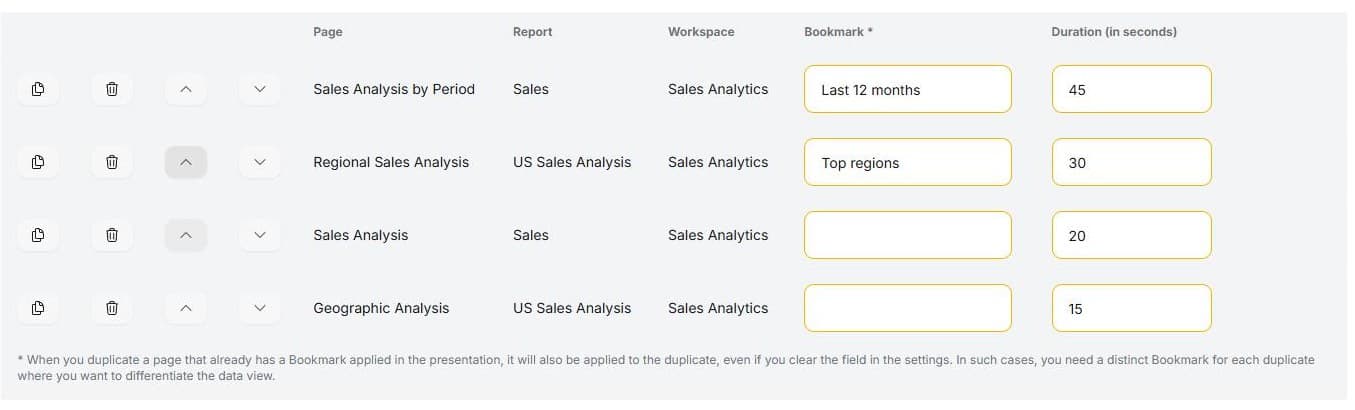
A wall display does not have to map to a single report. A composition pulls individual pages from any of your workspaces into one ordered rotation: sales from one report, operations from another, finance from a third.
- Drag pages into the order you want.
- Mix workspaces freely; each page keeps its own bookmark and duration.
- Stored in your account, so any screen can open the same composition.
No public link. No shortcuts.
Other ways to get Power BI onto a TV mean publishing the report to the web, where anyone with the link can open it, or leaving a signed-in PC looping browser tabs with nobody watching it. Power Slider does neither.
The usual workarounds
- Publish to web: a public link that anyone can open, with no sign-in asked.
- Browser tabs on a loop: a PC left signed in all day, with nobody watching it.
How Power Slider does it
- Each screen signs in with its own Microsoft account and sees only what that account is allowed to see.
- Read-only access through Microsoft's official APIs. It cannot edit reports or workspaces and never reads the data inside your datasets.
- Nothing is published. Your reports stay inside your Microsoft environment, under the permissions you already manage there.
- Remove a user's access in Microsoft and the screens signed in with that account lose the report at the next renewal.
Put your dashboards on the wall today
Sign in with the Microsoft account you already use for Power BI. The trial runs for 15 days and needs no card.
15 days free. No credit card required.